
Best for
- Use when asked to inspect, fix, or prepare a change for submission.
paperclipai/paperclip/.agents/skills/check-pr/SKILL.md
Check a GitHub, GitLab, or Perforce PR/MR/CL for review comments, failing checks, and PR-body gaps. Use when asked to inspect, fix, or prepare a change for submission.
Decision brief
Analyze a pull request (GitHub), merge request (GitLab), or shelved changelist (Perforce) for review comments, status checks, and description completeness, then help address any issues found.
In this controlled same-task single run, enabling check-pr changed the output from 2075 non-whitespace characters and 22 headings to 2518 characters and 11 headings. Matches among 8 signals extracted from the pinned source changed from 1 to 1. Both actual outputs are shown; this is a structural observation, not a quality score or a universal performance claim.
Review a flawed account-settings implementation for a small SaaS product. Prioritize concrete issues, explain impact, and provide corrected examples or decisions. The deliverable must specifically reflect this user intent: Check a GitHub, GitLab, or Perforce PR/MR/CL for review comments, failing checks, and PR-body gaps. Use when asked to inspect, fix, or prepare a change for submission.
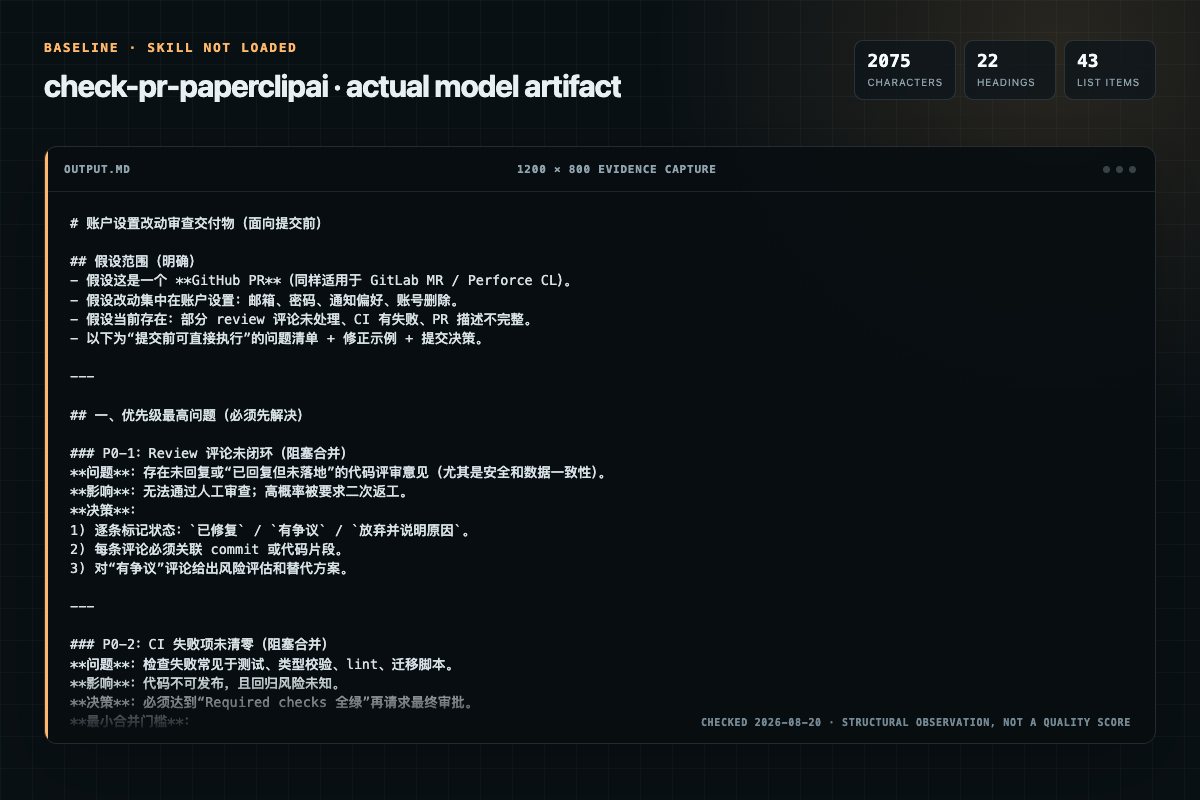
Baseline: 2075 non-whitespace characters, 22 headings, and 43 list items.
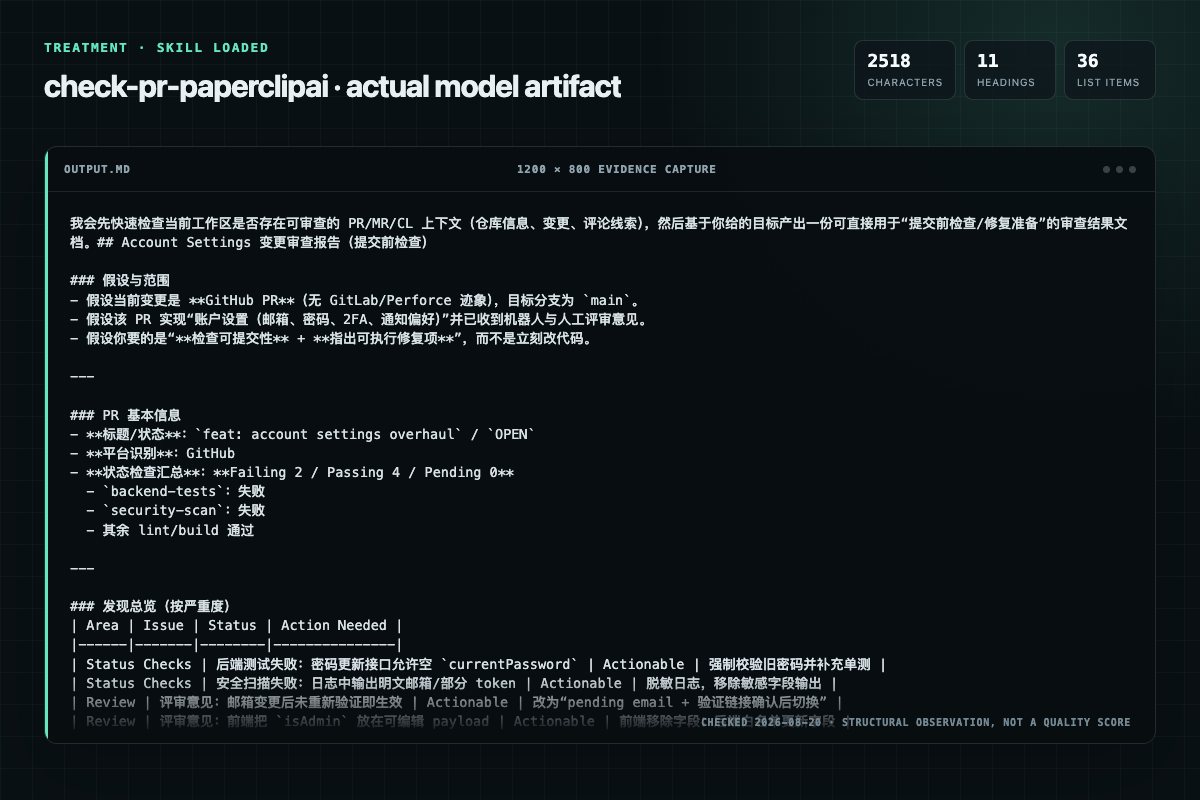
With Skill: 2518 non-whitespace characters, 11 headings, and 36 list items.
| Observation | Without Skill | With Skill |
|---|---|---|
| Source-signal coverage | 1/8: perforce | 1/8: perforce |
| Output structure | 2075 chars · 22 headings · 43 list items · 2 code blocks | 2518 chars · 11 headings · 36 list items · 2 code blocks |
| Verification and caution signals | 30 verification signals · 14 risk/limitation signals | 27 verification signals · 13 risk/limitation signals |
Use the check-pr Skill pinned at 5a1ce7aed823 for my task. Follow its source-specific constraints around `check-pr`, `inputs`, `instructions`, `detect`, then return the finished deliverable with explicit assumptions, verification, failure conditions, and limits. Do not treat the Skill text as a factual source or claim that a single demonstration proves universal performance.
Compatibility matrix
| Platform | Status | Evidence | What to check |
|---|---|---|---|
| Codex | Not declared | No explicit evidence | Portability before use |
| Claude Code | Not declared | No explicit evidence | Portability before use |
| Cursor | Not declared | No explicit evidence | Portability before use |
| Gemini CLI | Not declared | No explicit evidence | Portability before use |
Installation
The source command is displayed only when detected. A safe inspection prompt is always available so your agent can explain every action before execution.
npx skills add https://github.com/paperclipai/paperclip --skill ".agents/skills/check-pr"Inspect the Agent Skill "check-pr" from https://github.com/paperclipai/paperclip/blob/fa40a1b8d502ac19cfca2fcc5bbbdbf331410787/.agents/skills/check-pr/SKILL.md at commit fa40a1b8d502ac19cfca2fcc5bbbdbf331410787. List every install step, command, network request, credential, file read/write, external action, and rollback step. Explain whether it fits my task. Do not install or execute anything until I approve.
Workflow
First check if the user is working in a Perforce depot by looking for a .p4config file or P4CLIENT/P4PORT environment variables:
Review the “Get shelved files (for in-review CLs)” section in the pinned source before continuing.
p4 review -c bash glab api "projects/:fullpath/mergerequests//pipelines" bash HEADSHA=$(gh pr view --json headRefOid -q .headRefOid) bash OWNERREPO=$(gh repo view --json nameWithOwner -q .nameWithOwner) GREPTILECHECKS=$(gh api "repos/$OWNERREPO/commits/$HEADSHA/check-runs?perpag…
For GitHub PRs, do not treat an existing Greptile review, comment, or summary as current unless it is tied to the PR's exact current headRefOid. This is especially important after pushing a new commit to an existing PR: a Greptile review on an older commit is stale, even if the…
GREPTILENOTES=$(glab api "projects/:fullpath/mergerequests//discussions?perpage=100" \ | jq --arg sha "$MRSHA" '[.[].notes[] | select(.author.username | test("greptile"; "i"))] | sortby(.updatedat // .createdat)') GREPTILENOTECLEAN=$(echo "$GREPTILENOTES" \ | jq --arg sha "$MRSH…
Permission review
The documentation asks the agent to run terminal commands or scripts.
git add <files>The documentation asks the agent to run terminal commands or scripts.
git commit -m "address review feedback"The documentation asks the agent to create, modify, or delete local files.
p4 edit <file>Evidence record
| Signal | Value | Evidence type | Meaning |
|---|---|---|---|
| Quality score | 94/100 | Computed | Documentation, specificity, maintenance, and trust rules |
| Repository stars | 79,318 | Source | Repository attention, not individual Skill quality |
| Compatibility | 0 platforms | Source | Declared in the catalog source record |
| Usage guide | tested outcome page | Tested | Generated or reviewed according to the visible evidence level |
Pinned source
Analyze a pull request (GitHub), merge request (GitLab), or shelved changelist (Perforce) for review comments, status checks, and description completeness, then help address any issues found.
First check if the user is working in a Perforce depot by looking for a .p4config file or P4CLIENT/P4PORT environment variables:
# Check for Perforce environment
if p4 info >/dev/null 2>&1; then
  VCS="perforce"
else
  # Fall back to git remote detection
  REMOTE_URL=$(git remote get-url origin)
  if echo "$REMOTE_URL" | grep -qi "gitlab"; then
    VCS="gitlab"
  else
    VCS="github"
  fi
fi
For self-hosted GitLab instances whose hostname doesn't contain "gitlab", the user can override by passing --vcs gitlab as an input. For Perforce, the user can override by passing --vcs perforce.
If a number was provided, use it. Otherwise, detect it:
GitHub:
gh pr view --json number,headRefName,headRefOid -q '{number: .number, branch: .headRefName, head: .headRefOid}'
GitLab:
glab mr view --output json | jq '.iid'
Perforce:
# List pending changelists for the current user/client
p4 changes -s pending -u $P4USER -c $P4CLIENT
Key field differences between platforms:
number, headRefName, headRefOidiid, source_branch, shashelved files for in-review CLsGitHub:
gh pr view <PR_NUMBER> --json title,body,state,reviews,comments,headRefName,headRefOid,statusCheckRollup
OWNER_REPO=$(gh repo view --json nameWithOwner -q .nameWithOwner)
gh api "repos/$OWNER_REPO/pulls/<PR_NUMBER>/comments"
gh api --paginate "repos/$OWNER_REPO/issues/<PR_NUMBER>/comments?per_page=100"
GitHub PRs are also issues, so general PR comments live on the issue comments endpoint. Greptile may edit a single general PR comment on each review cycle instead of creating a new review or comment. Always inspect the latest Greptile-authored general comment by updated_at, including any "Prompt to fix all with AI" section, before concluding that the PR is clear.
GitLab:
glab mr view <MR_IID> --output json
# Fetch discussions (inline diff comments are type "DiffNote"; general comments have null type)
glab api "projects/:fullpath/merge_requests/<MR_IID>/discussions"
For GitLab, paginate discussions if needed (add ?per_page=100&page=N).
Perforce:
# Get changelist description, files, and status
p4 describe -s <CL_NUMBER>

# Get shelved files (for in-review CLs)
p4 describe -S <CL_NUMBER>

# Get the diff of the shelved changelist
p4 diff2 //...@=<CL_NUMBER> //...@=<CL_NUMBER>

# List review comments (if using p4 review workflow)
p4 review -c <CL_NUMBER>
Key Perforce CL fields:
Change: changelist numberStatus: pending, submitted, shelvedDescription: the CL description / commit messageFiles: list of files in the CLBefore analyzing, ensure all status checks have completed. If any checks are PENDING or IN_PROGRESS (GitHub) / running or pending (GitLab), poll every 30 seconds until all checks reach a terminal state.
GitHub: poll statusCheckRollup from gh pr view.
GitLab:
glab api "projects/:fullpath/merge_requests/<MR_IID>/pipelines"
Pipeline statuses: running, pending, success, failed, canceled, skipped. Poll until no pipeline has running or pending status.
Perforce: Perforce doesn't have built-in CI checks natively. If the team uses a review tool (Swarm, etc.) or an external CI triggered by shelve events, check the relevant system. Otherwise, proceed to analysis immediately.
For GitHub PRs, do not treat an existing Greptile review, comment, or summary as current unless it is tied to the PR's exact current headRefOid. This is especially important after pushing a new commit to an existing PR: a Greptile review on an older commit is stale, even if the PR still has a Greptile comment or prior review.
Fetch the current head SHA immediately before the Greptile gate:
HEAD_SHA=$(gh pr view <PR_NUMBER> --json headRefOid -q .headRefOid)
Then inspect check-runs for that commit and require a completed Greptile run:
OWNER_REPO=$(gh repo view --json nameWithOwner -q .nameWithOwner)
GREPTILE_CHECKS=$(gh api "repos/$OWNER_REPO/commits/$HEAD_SHA/check-runs?per_page=100" \
  --jq '[.check_runs[] | select(.name | test("greptile"; "i"))]')

# A run only counts as a valid fresh pass when it has completed AND concluded cleanly.
# GitHub check-run conclusions: success, neutral, skipped, failure, timed_out,
# cancelled, action_required, stale. Treat success/neutral as clean;
# everything else (especially failure and action_required) must block.
FRESH_GREPTILE_COMPLETED=$(echo "$GREPTILE_CHECKS" \
  | jq '[.[] | select(.status == "completed")] | length')
FRESH_GREPTILE_CLEAN=$(echo "$GREPTILE_CHECKS" \
  | jq '[.[] | select(.status == "completed" and (.conclusion | IN("success","neutral")))] | length')
FRESH_GREPTILE_BLOCKING=$(echo "$GREPTILE_CHECKS" \
  | jq '[.[] | select(.status == "completed" and ((.conclusion | IN("success","neutral")) | not))] | length')

if [ "$FRESH_GREPTILE_COMPLETED" = "0" ]; then
  echo "Blocked: no completed Greptile review/check is tied to current PR head $HEAD_SHA."
  echo "Request a fresh Greptile review against this head before marking the PR check done."
  echo "Suggested trigger: gh pr comment <PR_NUMBER> --body \"@greptile review\""
  exit 1
fi

if [ "$FRESH_GREPTILE_BLOCKING" != "0" ] || [ "$FRESH_GREPTILE_CLEAN" = "0" ]; then
  echo "Blocked: Greptile completed on head $HEAD_SHA but did not conclude clean"
  echo "(conclusion was failure/action_required/timed_out/cancelled/stale, or no clean run exists)."
  echo "Address the findings, push, and re-run Greptile until it concludes success/clean on the new head."
  exit 1
fi
If a Greptile check exists for the current head but is still pending or in progress, wait for it with the same polling pattern used by greploop rather than proceeding from older review material. If no Greptile check appears for the current head after a reasonable wait, report the PR as blocked on a fresh Greptile review for HEAD_SHA and stop. Do not mark the check complete from PR comments, PR reviews, or Greptile summaries that cannot be associated with the current head SHA.
For GitLab installations with Greptile integration, apply the same freshness rule against the MR's current head SHA:
# 1. Get the MR's current head SHA
MR_SHA=$(glab mr view <MR_IID> --output json | jq -r '.sha // .diff_refs.head_sha')

# 2. Find the latest pipeline for that EXACT sha, then the Greptile job within it.
LATEST_PIPELINE_ID=$(glab api "projects/:fullpath/merge_requests/<MR_IID>/pipelines" \
  | jq -r --arg sha "$MR_SHA" '[.[] | select(.sha == $sha)] | sort_by(.id) | last | .id // empty')

if [ -n "$LATEST_PIPELINE_ID" ]; then
  GREPTILE_JOBS=$(glab api "projects/:fullpath/pipelines/$LATEST_PIPELINE_ID/jobs" \
    | jq --arg sha "$MR_SHA" '[.[] | select(.name | test("greptile"; "i"))
        | {name, status, pipeline_sha: $sha}]')
else
  GREPTILE_JOBS='[]'
fi

GREPTILE_JOB_SUCCESS=$(echo "$GREPTILE_JOBS" \
  | jq '[.[] | select(.status == "success")] | length')
GREPTILE_JOB_BLOCKING=$(echo "$GREPTILE_JOBS" \
  | jq '[.[] | select(.status != "success")] | length')

# 3. If Greptile integrates via MR notes instead of a CI job, require the newest
#    Greptile note to reference the current head sha and report a clean review.
GREPTILE_NOTES=$(glab api "projects/:fullpath/merge_requests/<MR_IID>/discussions?per_page=100" \
  | jq --arg sha "$MR_SHA" '[.[].notes[]
      | select(.author.username | test("greptile"; "i"))]
      | sort_by(.updated_at // .created_at)')
GREPTILE_NOTE_CLEAN=$(echo "$GREPTILE_NOTES" \
  | jq --arg sha "$MR_SHA" 'if length == 0 then 0
      elif ((last.body // "") | contains($sha) and test("Confidence Score:[[:space:]]*5/5|Confidence:[[:space:]]*5/5|\\b5/5\\b"; "i") and (test("Prompt To Fix|blocking issue|failed|action required"; "i") | not)) then 1
      else 0 end')

if [ "$GREPTILE_JOB_SUCCESS" = "0" ] && [ "$GREPTILE_NOTE_CLEAN" = "0" ]; then
  echo "Blocked: no successful Greptile job or completed-clean current-head Greptile note is tied to MR head $MR_SHA."
  exit 1
fi

if [ "$GREPTILE_JOB_BLOCKING" != "0" ]; then
  echo "Blocked: at least one Greptile job for MR head $MR_SHA did not succeed."
  exit 1
fi
Block completion if, for MR_SHA, there is (a) no Greptile job or note at all (missing), (b) the newest Greptile job/note is tied to a different sha (stale), or (c) the Greptile job status is not success. A completed Greptile result for a different SHA is stale and must block completion.
For Perforce installations with Greptile integration, apply the same rule using the CL's current shelved-revision identity and the Greptile webhook/review artifact tied to it; a Greptile result for an earlier shelf is stale and must block completion.
Once all checks are complete, evaluate these areas:
greptile-apps[bot] on GitHub, or the Greptile bot user on GitLab, linters, etc.)p4 review or external review toolsupdated_at to catch bot comments edited in place. Greptile's latest edited summary can contain actionable items even when there are no new inline comments.For each issue found, categorize as:
| Category | Meaning |
|---|---|
| Actionable | Code changes, test improvements, or fixes needed |
| Informational | Verification notes, questions, or FYIs that don't require changes |
| Already addressed | Issues that appear to be resolved by subsequent commits |
Present a summary table:
| Area | Issue | Status | Action Needed |
|---|---|---|---|
| Status Checks | CI build failing | Failing | Fix type error in src/api.ts |
| Review | "Add null check" - @reviewer | Actionable | Add guard clause |
| Description | TODO placeholder in test plan | Actionable | Fill in test plan |
| Review | "Looks good" - @teammate | Informational | None |
If there are actionable items:
GitHub/GitLab: commit and push:
git add <files>
git commit -m "address review feedback"
git push
Perforce: open files for edit, make changes, and re-shelve:
p4 edit <file>
# make changes
p4 shelve -f -c <CL_NUMBER>
After addressing comments, resolve the corresponding review threads.
Perforce - Perforce does not have a native "resolve thread" concept. Instead, mark comments as addressed by updating the CL description or by responding in the review tool being used (Swarm, etc.). If using p4 review:
# Mark files as reviewed after addressing feedback
p4 review -c <CL_NUMBER>
GitHub - fetch unresolved thread IDs (paginate if needed - see the GraphQL reference):
gh api graphql -f query='
query($cursor: String) {
  repository(owner: "OWNER", name: "REPO") {
    pullRequest(number: PR_NUMBER) {
      reviewThreads(first: 100, after: $cursor) {
        pageInfo { hasNextPage endCursor }
        nodes {
          id
          isResolved
          comments(first: 1) {
            nodes { body path }
          }
        }
      }
    }
  }
}'
If hasNextPage is true, repeat with -f cursor=ENDCURSOR to get remaining threads.
Then resolve threads that have been addressed or are informational:
gh api graphql -f query='
mutation {
  resolveReviewThread(input: {threadId: "THREAD_ID"}) {
    thread { isResolved }
  }
}'
Batch multiple resolutions into a single mutation using aliases (t1, t2, etc.).
GitLab - fetch unresolved discussions (see the GitLab API reference):
glab api "projects/:fullpath/merge_requests/<MR_IID>/discussions?per_page=100"
Filter for discussions where "resolved": false. Collect each discussion's id.
Resolve each discussion individually (GitLab has no batch resolution):
glab api --method PUT \
  "projects/:fullpath/merge_requests/<MR_IID>/discussions/<DISCUSSION_ID>" \
  --field resolved=true
Repeat for each unresolved discussion ID.
If checking a chain of PRs/MRs/CLs, process them sequentially.
Perforce - to check multiple changelists at once:
p4 changes -s pending -u $P4USER -c $P4CLIENT -l
Summarize:
Frequently asked questions
Analyze a pull request (GitHub), merge request (GitLab), or shelved changelist (Perforce) for review comments, status checks, and description completeness, then help address any issues found.
The source record exposes this install command: npx skills add https://github.com/paperclipai/paperclip --skill ".agents/skills/check-pr". Inspect the command and pinned source before running it.
Static rules flagged exec-script, write-files in the source; the page lists the matching lines and excerpts.
Alternatives
coreyhaines31/marketingskills
When the user wants to plan, design, or implement an A/B test or experiment, or build a growth experimentation program. Also use when the user mentions "A/B test," "split test," "experiment," "test this change," "variant copy," "multivariate test," "hypothesis," "should I test this," "which version is better," "test two versions," "statistical significance," "how long should I run this test," "growth experiments," "experiment velocity," "experiment backlog," "ICE score," "experimentation program
coreyhaines31/marketingskills
When the user wants to reduce churn, build cancellation flows, set up save offers, recover failed payments, or implement retention strategies. Also use when the user mentions 'churn,' 'cancel flow,' 'offboarding,' 'save offer,' 'dunning,' 'failed payment recovery,' 'win-back,' 'retention,' 'exit survey,' 'pause subscription,' 'involuntary churn,' 'people keep canceling,' 'churn rate is too high,' 'how do I keep users,' or 'customers are leaving.' Use this whenever someone is losing subscribers o
alirezarezvani/claude-skills
App Store Optimization (ASO) toolkit for researching keywords, analyzing competitor rankings, generating metadata suggestions, and improving app visibility on Apple App Store and Google Play Store. Use when the user asks about ASO, app store rankings, app metadata, app titles and descriptions, app store listings, app visibility, or mobile app marketing on iOS or Android. Supports keyword research and scoring, competitor keyword analysis, metadata optimization, A/B test planning, launch checklist
wanshuiyin/Auto-claude-code-research-in-sleep
Use it for operations and research tasks; the detail page covers purpose, installation, and practical steps.