
Tested demoQuality 94/100Review permissions
monte-carlo-data/mc-agent-toolkit/skills/generate-validation-notebook/SKILL.md
generate-validation-notebook
Generate SQL validation notebooks for dbt changes. Pass a GitHub PR URL or local dbt repo path.
- Source repository stars
- 91
- Declared platforms
- 0
- Static risk flags
- 1
- Last source update
- 2026-08-24
- Source checked
- 2026-08-28
Decision brief
What it does: where it fits
Prerequisites: - gh (GitHub CLI) — required for PR mode. Must be authenticated (gh auth status). - python3 — required for helper scripts. - pyyaml — install with pip3 install pyyaml (or pip install pyyaml, uv pip install pyyaml, etc.)
Not for
- Tasks that require unconfirmed production actions or broad system permissions.
- Environments where the pinned source and install steps cannot be inspected.
Controlled single-run demoChecked 2026-08-20
What changed when the Skill was used
In this controlled same-task single run, enabling generate-validation-notebook changed the output from 3306 non-whitespace characters and 12 headings to 2672 characters and 10 headings. Matches among 8 signals extracted from the pinned source changed from 1 to 2. Both actual outputs are shown; this is a structural observation, not a quality score or a universal performance claim.
Same test task
Analyze a small SaaS churn scenario and produce a concrete analysis plan with data checks, method choices, expected outputs, and validation steps. The deliverable must specifically reflect this user intent: Generate SQL validation notebooks for dbt changes. Pass a GitHub PR URL or local dbt repo path.
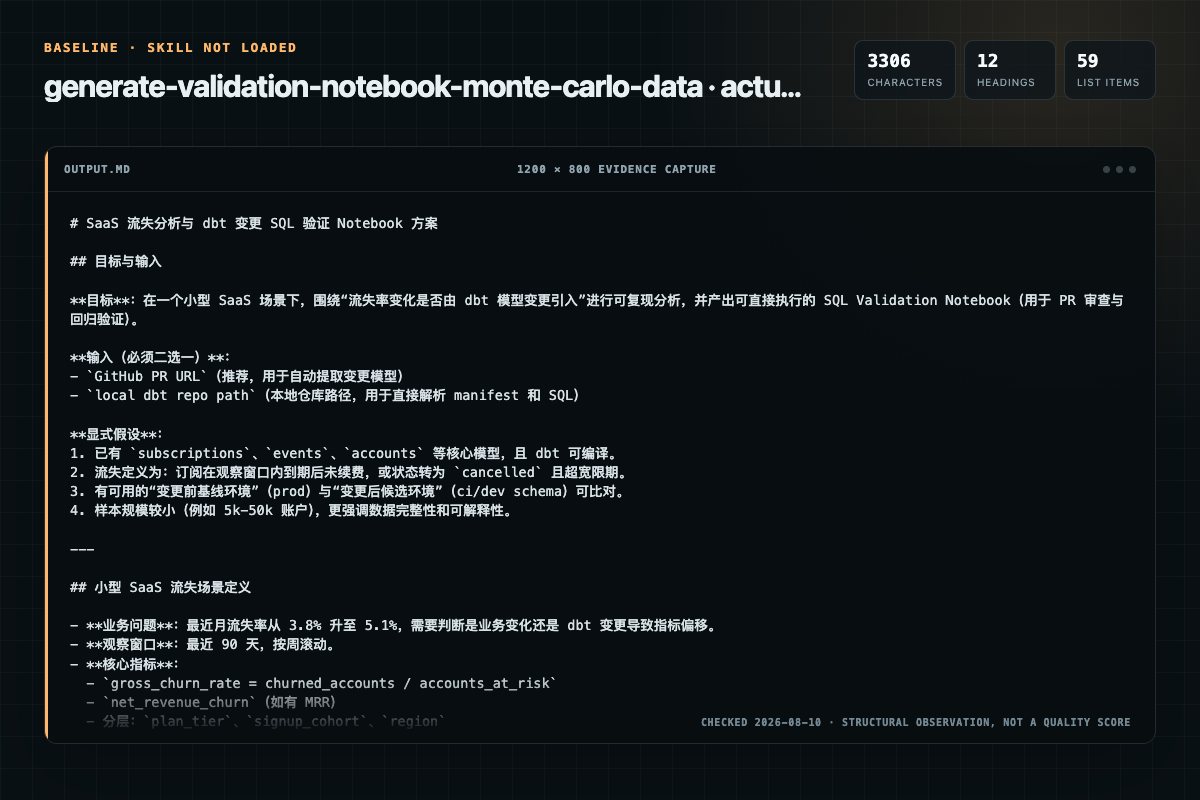
Baseline: 3306 non-whitespace characters, 12 headings, and 59 list items.
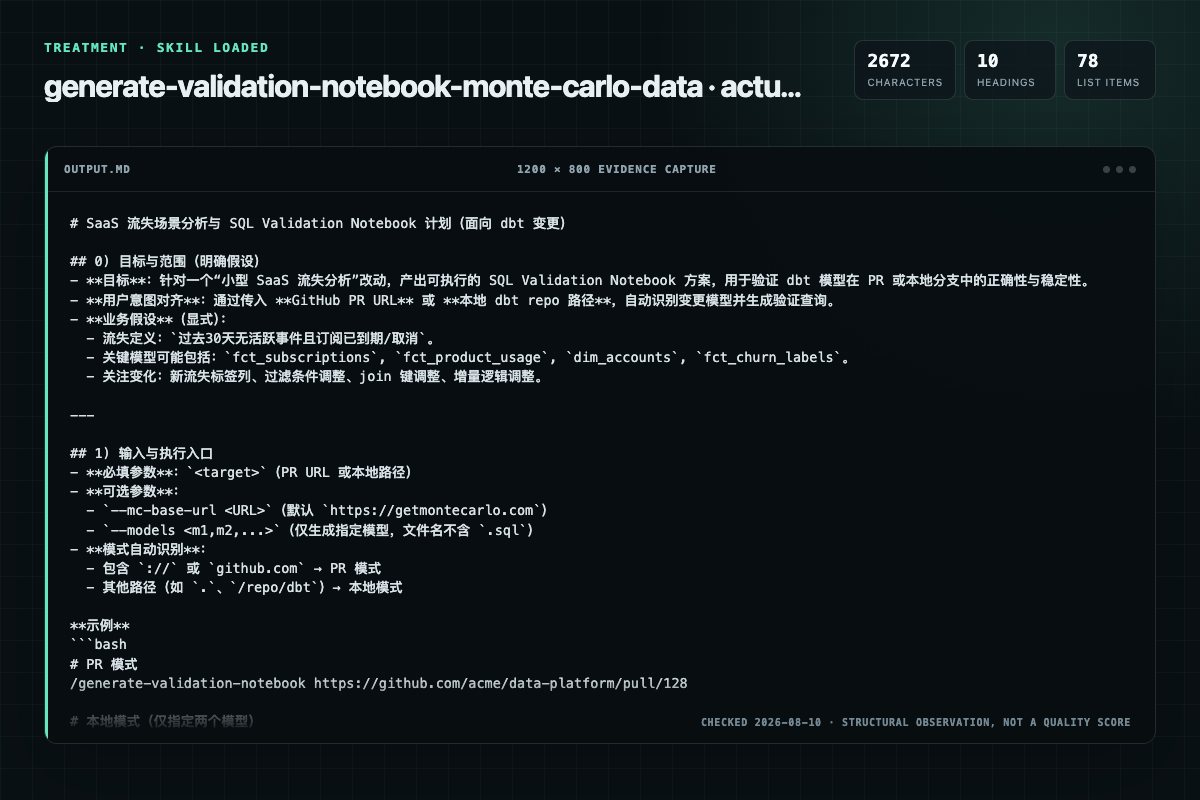
With Skill: 2672 non-whitespace characters, 10 headings, and 78 list items.
| Observation | Without Skill | With Skill |
|---|---|---|
| Source-signal coverage | 1/8: notebook | 2/8: generate-validation-notebook, notebook |
| Output structure | 3306 chars · 12 headings · 59 list items · 3 code blocks | 2672 chars · 10 headings · 78 list items · 1 code blocks |
| Verification and caution signals | 18 verification signals · 8 risk/limitation signals | 27 verification signals · 5 risk/limitation signals |
A prompt you can use
Use the generate-validation-notebook Skill pinned at b7e848b845a2 for my task. Follow its source-specific constraints around `generate-validation-notebook`, `setup`, `detection`, `context`, then return the finished deliverable with explicit assumptions, verification, failure conditions, and limits. Do not treat the Skill text as a factual source or claim that a single demonstration proves universal performance.
Method and limitationsExpandCollapse
Test method
- Baseline and treatment used the same task, model (gpt-5.3-codex-low), and runner; the only planned difference was whether the complete target Skill text was injected.
- The treatment used snapshot 3c88d016801b7a47be580d559cb3183ea3916cda; the current source commit b7e848b845a29799bedb792d0830cb9e76afa0cb was verified against content hash ae7de176d1d0. The baseline explicitly prohibited loading any Skill or external rule file.
- The same deterministic script counted characters, headings, lists, code blocks, verification terms, caution terms, and source signals in both artifacts. Source signals: `generate-validation-notebook`, `setup`, `detection`, `context`, `notebook`, `reference`, `parameter`, `phase`.
- The visuals are local screenshots of the actual Markdown artifacts in a fixed 1200 × 800 evidence canvas, not recreated product mockups. Raw JSON artifacts and request records are retained in the research directory.
Do not over-read this demo
- This is one controlled demonstration per condition, not a multi-run statistical benchmark; the model is stochastic.
- Character, structure, and keyword counts show observable differences but cannot by themselves prove correctness, originality, or business impact.
- The task is a representative test designed for repeatability, not every real-world use of the Skill; rerun after a material source change.
- Editorial review
- SkillSignal editorial
- Runner
- Cursor Agent 2026.07.09-a3815c0
- Model
- gpt-5.3-codex-low
- Refresh due
- 2026-11-18
- Reviewed commit
- b7e848b845a29799bedb792d0830cb9e76afa0cb
- Test snapshot
- 3c88d016801b7a47be580d559cb3183ea3916cda
Compatibility matrix
Platform support, with evidence labels
| Platform | Status | Evidence | What to check |
|---|---|---|---|
| Codex | Not declared | No explicit evidence | Portability before use |
| Claude Code | Not declared | No explicit evidence | Portability before use |
| Cursor | Not declared | No explicit evidence | Portability before use |
| Gemini CLI | Not declared | No explicit evidence | Portability before use |
Installation
Inspect first. Install second.
The source command is displayed only when detected. A safe inspection prompt is always available so your agent can explain every action before execution.
Source-detected install commandSource
npx skills add https://github.com/monte-carlo-data/mc-agent-toolkit --skill "skills/generate-validation-notebook"Safe inspection promptEditorial
Inspect the Agent Skill "generate-validation-notebook" from https://github.com/monte-carlo-data/mc-agent-toolkit/blob/b7e848b845a29799bedb792d0830cb9e76afa0cb/skills/generate-validation-notebook/SKILL.md at commit b7e848b845a29799bedb792d0830cb9e76afa0cb. List every install step, command, network request, credential, file read/write, external action, and rollback step. Explain whether it fits my task. Do not install or execute anything until I approve.
Workflow
What the source asks the agent to do
- 01
Phase 1: Get Changed Files
The approach differs based on mode:
Extract the PR number and repo from the target URL.Example: https://github.com/monte-carlo-data/dbt/pull/3386 - owner=monte-carlo-data, repo=dbt, PR=3386Fetch PR metadata using gh: - 02
Phase 2: Parse Changed Models
For EACH changed dbt model .sql file, parse and extract:
/models//.sql - table is (uppercase, taken from the filename)Setup: Save dbtproject.yml and model files to /tmp/validationnotebookworking// preserving paths:Run the script for each model: - 03
Phase 3: Generate Validation Queries
For each changed model, generate the applicable queries based on its classification (new vs modified).
Use {{proddb}}.. for prod queriesUse {{devdb}}.. for dev queriesis hardcoded per-model using the output from the schema resolution script - 04
Phase 4: Build Notebook YAML
Only include proddb if there are modified models. If all models are new, only include devdb.
Only include proddb if there are modified models. If all models are new, only include devdb. - 05
Phase 5: Generate Import URL
1. Write notebook YAML to /tmp/validationnotebookworking//notebook.yaml 2. Run the URL generation script:
Write notebook YAML to /tmp/validationnotebookworking//notebook.yamlRun the URL generation script:The script validates both YAML syntax and notebook schema (required fields on metadata and cells). If validation fails, read the error messages carefully, fix the YAML to match the spec in Phase 4, and re-run.
Permission review
Static risk signals and limitations
Runs scripts
The documentation asks the agent to run terminal commands or scripts.
git rev-parse --abbrev-ref HEADRuns scripts
The documentation asks the agent to run terminal commands or scripts.
git diff --name-only <base_branch>...HEAD -- '*.sql'Evidence record
Why each signal appears
EvidenceSourceComputedTestedEditorial
| Signal | Value | Evidence type | Meaning |
|---|---|---|---|
| Quality score | 94/100 | Computed | Documentation, specificity, maintenance, and trust rules |
| Repository stars | 91 | Source | Repository attention, not individual Skill quality |
| Compatibility | 0 platforms | Source | Declared in the catalog source record |
| Usage guide | tested outcome page | Tested | Generated or reviewed according to the visible evidence level |
Pinned source
Provenance and original SKILL.md
- Repository
- monte-carlo-data/mc-agent-toolkit
- Skill path
- skills/generate-validation-notebook/SKILL.md
- Commit
- b7e848b845a29799bedb792d0830cb9e76afa0cb
- License
- Apache-2.0
- Collected
- 2026-08-28
- Default branch
- main
View the original SKILL.md
Tip: This skill works well with Sonnet. Run
/model sonnetbefore invoking for faster generation.
Generate a SQL Notebook with validation queries for dbt changes.
Arguments: $ARGUMENTS
Parse the arguments:
- Target (required): first argument — a GitHub PR URL or local dbt repo path
- MC Base URL (optional):
--mc-base-url <URL>— defaults tohttps://getmontecarlo.com - Models (optional):
--models <model1,model2,...>— comma-separated list of model filenames (without.sqlextension) to generate queries for. Only these models will be included. By default, all changed models are included up to a maximum of 10.
Setup
Prerequisites:
gh(GitHub CLI) — required for PR mode. Must be authenticated (gh auth status).python3— required for helper scripts.pyyaml— install withpip3 install pyyaml(orpip install pyyaml,uv pip install pyyaml, etc.)
Note: Generated SQL uses ANSI-compatible syntax that works across Snowflake, BigQuery, Redshift, and Athena. Minor adjustments may be needed for specific warehouse quirks.
This skill includes two helper scripts in ${CLAUDE_PLUGIN_ROOT}/skills/generate-validation-notebook/scripts/:
resolve_dbt_schema.py- Resolves dbt model output schemas fromdbt_project.ymlrouting rules and model config overrides.generate_notebook_url.py- Encodes notebook YAML into a base64 import URL and opens it in the browser.
Mode Detection
Auto-detect mode from the target argument:
- If target looks like a URL (contains
://orgithub.com) -> PR mode - If target is a path (
.,/path/to/repo, relative path) -> Local mode
Context
This command generates a SQL Notebook containing validation queries for dbt changes. The notebook can be opened in the MC Bridge SQL Notebook interface for interactive validation.
The output is an import URL that opens directly in the notebook interface:
<MC_BASE_URL>/notebooks/import#<base64-encoded-yaml>
Key Features:
- Database Parameters: Two
textparameters (prod_dbanddev_db) for selecting databases - Schema Inference: Automatically infers schema per model from
dbt_project.ymland model configs - Single-table queries: Basic validation queries using
{{prod_db}}.<SCHEMA>.<TABLE> - Comparison queries: Before/after queries comparing
{{prod_db}}vs{{dev_db}} - Flexible usage: Users can set both parameters to the same database for single-database analysis
Notebook YAML Spec Reference
Key structure:
version: 1
metadata:
  id: string           # kebab-case + random suffix
  name: string         # display name
  created_at: string   # ISO 8601
  updated_at: string   # ISO 8601
default_context:       # optional database/schema context
  database: string
  schema: string
cells:
  - id: string
    type: sql | markdown | parameter
    content: string    # SQL, markdown, or parameter config (JSON)
    display_type: table | bar | timeseries
Parameter Cell Spec
Parameter cells allow defining variables referenced in SQL via {{param_name}} syntax:
- id: param-prod-db
  type: parameter
  content:
    name: prod_db              # variable name
    config:
      type: text                   # free-form text input
      default_value: "ANALYTICS"
      placeholder: "Prod database"
  display_type: table
Parameter types:
text: Free-form text input (used for database names)schema_selector: Two dropdowns (database -> schema), value stored asDATABASE.SCHEMAdropdown: Select from predefined options
Task
Generate a SQL Notebook with validation queries based on the mode and target.
Phase 1: Get Changed Files
The approach differs based on mode:
If PR mode (GitHub PR):
-
Extract the PR number and repo from the target URL.
- Example:
https://github.com/monte-carlo-data/dbt/pull/3386-> owner=monte-carlo-data, repo=dbt, PR=3386
- Example:
-
Fetch PR metadata using
gh:
gh pr view <PR#> --repo <owner>/<repo> --json number,title,author,mergedAt,headRefOid
- Fetch the list of changed files:
gh pr view <PR#> --repo <owner>/<repo> --json files --jq '.files[].path'
- Fetch the diff:
gh pr diff <PR#> --repo <owner>/<repo>
-
Filter the changed files list to only
.sqlfiles undermodels/orsnapshots/directories (at any depth — e.g.,models/,analytics/models/,dbt/models/). These are the dbt models to analyze. If no model SQL files were changed, report that and stop. -
For each changed model file, fetch the full file content at the head SHA:
gh api repos/<owner>/<repo>/contents/<file_path>?ref=<head_sha> --jq '.content' | python3 -c "import sys,base64; sys.stdout.write(base64.b64decode(sys.stdin.read()).decode())"
- Fetch dbt_project.yml for schema resolution. Detect the dbt project root by looking at the changed file paths — find the common parent directory that contains
dbt_project.yml. Try these paths in order until one succeeds:
gh api repos/<owner>/<repo>/contents/<dbt_root>/dbt_project.yml?ref=<head_sha> --jq '.content' | python3 -c "import sys,base64; sys.stdout.write(base64.b64decode(sys.stdin.read()).decode())"
Common <dbt_root> locations: analytics, . (repo root), dbt, transform. Try each until found.
Save dbt_project.yml to /tmp/validation_notebook_working/<PR#>/dbt_project.yml.
If Local mode (Local Directory):
-
Change to the target directory.
-
Get current branch info:
git rev-parse --abbrev-ref HEAD
-
Detect base branch - try
main,master,developin order, or use upstream tracking branch. -
Get the list of changed SQL files compared to base branch:
git diff --name-only <base_branch>...HEAD -- '*.sql'
-
Filter to only
.sqlfiles undermodels/orsnapshots/directories (at any depth — e.g.,models/,analytics/models/,dbt/models/). If no model SQL files were changed, report that and stop. -
Get the diff for each changed file:
git diff <base_branch>...HEAD -- <file_path>
-
Read model files directly from the filesystem.
-
Find dbt_project.yml:
find . -name "dbt_project.yml" -type f | head -1
- For notebook metadata in local mode, use:
- ID:
local-<branch-name>-<timestamp> - Title:
Local: <branch-name> - Author: Output of
git config user.name - Merged: "N/A (local)"
- ID:
Model Selection (applies to both modes)
After filtering to .sql files under models/ or snapshots/:
-
If
--modelswas specified: Filter the changed files list to only include models whose filename (without.sqlextension, case-insensitive) matches one of the specified model names. If any specified model is not found in the changed files, warn the user but continue with the models that were found. If none match, report that and stop. -
Model cap: If more than 10 models remain after filtering, select the first 10 (by file path order) and warn the user:
⚠️ <total_count> models changed — generating validation queries for the first 10 only.
To generate for specific models, re-run with: --models <model1,model2,...>
Skipped models: <list of skipped model filenames>
Phase 2: Parse Changed Models
For EACH changed dbt model .sql file, parse and extract:
2a. Model Metadata
Output table name -- Derive from file name:
<any_path>/models/<subdir>/<model_name>.sql-> table is<MODEL_NAME>(uppercase, taken from the filename)
Output schema -- Use the schema resolution script:
-
Setup: Save
dbt_project.ymland model files to/tmp/validation_notebook_working/<id>/preserving paths:/tmp/validation_notebook_working/<id>/ +-- dbt_project.yml +-- models/ +-- <path>/<model>.sql -
Run the script for each model:
python3 ${CLAUDE_PLUGIN_ROOT}/skills/generate-validation-notebook/scripts/resolve_dbt_schema.py /tmp/validation_notebook_working/<id>/dbt_project.yml /tmp/validation_notebook_working/<id>/models/<path>/<model>.sql -
Error handling: If the script fails, STOP immediately and report the error. Do NOT proceed with notebook generation if schema resolution fails.
-
Output: The script prints the resolved schema (e.g.,
PROD,PROD_STAGE,PROD_LINEAGE)
Note: Do NOT manually parse dbt_project.yml or model configs for schema -- always use the script. It handles model config overrides, dbt_project.yml routing rules, PROD_ prefix for custom schemas, and defaults to PROD.
Config block -- Look for {{ config(...) }} and extract:
materialized-- 'table', 'view', 'incremental', 'ephemeral'unique_key-- the dedup key (may be a string or list)cluster_by-- clustering fields (may contain the time axis)
Core segmentation fields -- Scan the entire model SQL for fields likely to be business keys:
- Fields named
*_id(e.g.,account_id,resource_id,monitor_id) that appear in JOIN ON, GROUP BY, PARTITION BY, orunique_key - Deduplicate and rank by frequency. Take the top 3.
Time axis field -- Detect the model's time dimension (in priority order):
is_incremental()block: field used in the WHERE comparisoncluster_byconfig: timestamp/date fields- Field name conventions:
ingest_ts,created_time,date_part,timestamp,run_start_time,export_ts,event_created_time - ORDER BY DESC in QUALIFY/ROW_NUMBER
If no time axis is found, skip time-axis queries for this model.
2b. Diff Analysis
Parse the diff hunks for this file. Classify each changed line:
- Changed fields -- Lines added/modified in SELECT clauses or CTE definitions. Extract the output column name.
- Changed filters -- Lines added/modified in WHERE clauses.
- Changed joins -- Lines added/modified in JOIN ON conditions.
- Changed unique_key -- If
unique_keyin config was modified, note both old and new values. - New columns -- Columns in "after" SELECT that don't appear in "before" (pure additions).
2c. Model Classification
Classify each model as new or modified based on the diff:
- If the diff for this file contains
new file mode→ classify as new - Otherwise → classify as modified
This classification determines which query patterns are generated in Phase 3.
Note: For new models, Phase 2b diff analysis is skipped (there is no "before" to compare against). Phase 2a metadata extraction still applies.
Phase 3: Generate Validation Queries
For each changed model, generate the applicable queries based on its classification (new vs modified).
CRITICAL: Parameter Placeholder Syntax
Use double curly braces {{...}} for parameter placeholders. Do NOT use ${...} or any other syntax.
Correct: {{prod_db}}.PROD.AGENT_RUNS
Wrong: ${prod_db}.PROD.AGENT_RUNS
Table Reference Format:
- Use
{{prod_db}}.<SCHEMA>.<TABLE_NAME>for prod queries - Use
{{dev_db}}.<SCHEMA>.<TABLE_NAME>for dev queries <SCHEMA>is hardcoded per-model using the output from the schema resolution script
Query Patterns for NEW Models
For new models, all queries target {{dev_db}} only. No comparison queries are generated since no prod table exists.
Pattern 7-new: Total Row Count
Trigger: Always.
SELECT COUNT(*) AS total_rows
FROM {{dev_db}}.<SCHEMA>.<TABLE_NAME>
Pattern 9: Sample Data Preview
Trigger: Always.
SELECT *
FROM {{dev_db}}.<SCHEMA>.<TABLE_NAME>
LIMIT 20
Pattern 2-new: Core Segmentation Counts
Trigger: Always.
SELECT
    <segmentation_field>,
    COUNT(*) AS row_count
FROM {{dev_db}}.<SCHEMA>.<TABLE_NAME>
GROUP BY <segmentation_field>
ORDER BY row_count DESC
LIMIT 100
Pattern 5: Uniqueness Check
Trigger: Always for new models (verify unique_key constraint from the start).
SELECT
    COUNT(*) AS total_rows,
    COUNT(DISTINCT <key_fields>) AS distinct_keys,
    COUNT(*) - COUNT(DISTINCT <key_fields>) AS duplicate_count
FROM {{dev_db}}.<SCHEMA>.<TABLE_NAME>
SELECT <key_fields>, COUNT(*) AS n
FROM {{dev_db}}.<SCHEMA>.<TABLE_NAME>
GROUP BY <key_fields>
HAVING COUNT(*) > 1
ORDER BY n DESC
LIMIT 100
Pattern 6-new: NULL Rate Check (all columns)
Trigger: Always. Checks all output columns since everything is new.
SELECT
    COUNT(*) AS total_rows,
    SUM(CASE WHEN <col1> IS NULL THEN 1 ELSE 0 END) AS <col1>_null_count,
    ROUND(100.0 * SUM(CASE WHEN <col1> IS NULL THEN 1 ELSE 0 END) / NULLIF(COUNT(*), 0), 2) AS <col1>_null_pct,
    SUM(CASE WHEN <col2> IS NULL THEN 1 ELSE 0 END) AS <col2>_null_count,
    ROUND(100.0 * SUM(CASE WHEN <col2> IS NULL THEN 1 ELSE 0 END) / NULLIF(COUNT(*), 0), 2) AS <col2>_null_pct
    -- repeat for each output column
FROM {{dev_db}}.<SCHEMA>.<TABLE_NAME>
Pattern 8: Time-Axis Continuity
Trigger: Model is materialized='incremental' OR a time axis field was identified.
SELECT
    CAST(<time_axis> AS DATE) AS day,
    COUNT(*) AS row_count
FROM {{dev_db}}.<SCHEMA>.<TABLE_NAME>
WHERE <time_axis> >= CURRENT_TIMESTAMP - INTERVAL '14' DAY
GROUP BY day
ORDER BY day DESC
LIMIT 30
Query Patterns for MODIFIED Models
For modified models, single-table queries use {{prod_db}} and comparison queries use both.
Pattern 7: Total Row Count
Trigger: Always.
SELECT COUNT(*) AS total_rows
FROM {{prod_db}}.<SCHEMA>.<TABLE_NAME>
Pattern 9: Sample Data Preview
Trigger: Always.
SELECT *
FROM {{prod_db}}.<SCHEMA>.<TABLE_NAME>
LIMIT 20
Pattern 2: Core Segmentation Counts
Trigger: Always.
SELECT
    <segmentation_field>,
    COUNT(*) AS row_count
FROM {{prod_db}}.<SCHEMA>.<TABLE_NAME>
GROUP BY <segmentation_field>
ORDER BY row_count DESC
LIMIT 100
Pattern 1: Changed Field Distribution
Trigger: Changed fields found in Phase 2b. Exclude added columns (from "New columns" in Phase 2b) — only include fields that exist in prod.
SELECT
    <changed_field>,
    COUNT(*) AS row_count,
    ROUND(COUNT(*) * 100.0 / SUM(COUNT(*)) OVER(), 2) AS pct
FROM {{prod_db}}.<SCHEMA>.<TABLE_NAME>
GROUP BY <changed_field>
ORDER BY row_count DESC
LIMIT 100
Pattern 5: Uniqueness Check
Trigger: JOIN condition changed, unique_key changed, or model is incremental.
SELECT
    COUNT(*) AS total_rows,
    COUNT(DISTINCT <key_fields>) AS distinct_keys,
    COUNT(*) - COUNT(DISTINCT <key_fields>) AS duplicate_count
FROM {{dev_db}}.<SCHEMA>.<TABLE_NAME>
SELECT <key_fields>, COUNT(*) AS n
FROM {{dev_db}}.<SCHEMA>.<TABLE_NAME>
GROUP BY <key_fields>
HAVING COUNT(*) > 1
ORDER BY n DESC
LIMIT 100
Pattern 6: NULL Rate Check
Trigger: New column added, or column wrapped in COALESCE/NULLIF.
Important: Added columns (from "New columns" in Phase 2b) do NOT exist in prod yet. For added columns, query {{dev_db}} only. For modified columns (COALESCE/NULLIF changes), compare both databases.
For added columns (dev only):
SELECT
    COUNT(*) AS total_rows,
    SUM(CASE WHEN <column> IS NULL THEN 1 ELSE 0 END) AS null_count,
    ROUND(100.0 * SUM(CASE WHEN <column> IS NULL THEN 1 ELSE 0 END) / NULLIF(COUNT(*), 0), 2) AS null_pct
FROM {{dev_db}}.<SCHEMA>.<TABLE_NAME>
For modified columns (prod vs dev):
SELECT
    'prod' AS source,
    COUNT(*) AS total_rows,
    SUM(CASE WHEN <column> IS NULL THEN 1 ELSE 0 END) AS null_count,
    ROUND(100.0 * SUM(CASE WHEN <column> IS NULL THEN 1 ELSE 0 END) / NULLIF(COUNT(*), 0), 2) AS null_pct
FROM {{prod_db}}.<SCHEMA>.<TABLE_NAME>
UNION ALL
SELECT
    'dev' AS source,
    COUNT(*) AS total_rows,
    SUM(CASE WHEN <column> IS NULL THEN 1 ELSE 0 END) AS null_count,
    ROUND(100.0 * SUM(CASE WHEN <column> IS NULL THEN 1 ELSE 0 END) / NULLIF(COUNT(*), 0), 2) AS null_pct
FROM {{dev_db}}.<SCHEMA>.<TABLE_NAME>
Pattern 8: Time-Axis Continuity
Trigger: Model is materialized='incremental' OR a time axis field was identified.
SELECT
    CAST(<time_axis> AS DATE) AS day,
    COUNT(*) AS row_count
FROM {{prod_db}}.<SCHEMA>.<TABLE_NAME>
WHERE <time_axis> >= CURRENT_TIMESTAMP - INTERVAL '14' DAY
GROUP BY day
ORDER BY day DESC
LIMIT 30
Pattern 3: Before/After Comparison
Trigger: Always (for changed fields + top segmentation field). Modified models only.
Important: Exclude added columns (from "New columns" in Phase 2b) from <group_fields>. Only use fields that exist in BOTH prod and dev. Added columns don't exist in prod and will cause query errors.
WITH prod AS (
    SELECT <group_fields>, COUNT(*) AS cnt
    FROM {{prod_db}}.<SCHEMA>.<TABLE_NAME>
    GROUP BY <group_fields>
),
dev AS (
    SELECT <group_fields>, COUNT(*) AS cnt
    FROM {{dev_db}}.<SCHEMA>.<TABLE_NAME>
    GROUP BY <group_fields>
)
SELECT
    COALESCE(b.<field>, d.<field>) AS <field>,
    COALESCE(b.cnt, 0) AS cnt_prod,
    COALESCE(d.cnt, 0) AS cnt_dev,
    COALESCE(d.cnt, 0) - COALESCE(b.cnt, 0) AS diff
FROM prod b
FULL OUTER JOIN dev d ON b.<field> = d.<field>
ORDER BY ABS(diff) DESC
LIMIT 100
Pattern 7b: Row Count Comparison
Trigger: Always. Modified models only.
SELECT 'prod' AS source, COUNT(*) AS row_count FROM {{prod_db}}.<SCHEMA>.<TABLE_NAME>
UNION ALL
SELECT 'dev' AS source, COUNT(*) AS row_count FROM {{dev_db}}.<SCHEMA>.<TABLE_NAME>
Phase 4: Build Notebook YAML
4a. Metadata
version: 1
metadata:
  id: validation-pr-<PR_NUMBER>-<random_suffix>
  name: "Validation: PR #<PR_NUMBER> - <PR_TITLE_TRUNCATED>"
  created_at: "<current_iso_timestamp>"
  updated_at: "<current_iso_timestamp>"
4b. Parameter Cells
Only include prod_db if there are modified models. If all models are new, only include dev_db.
# Include ONLY if there are modified models:
- id: param-prod-db
  type: parameter
  content:
    name: prod_db
    config:
      type: text
      default_value: "ANALYTICS"
      placeholder: "Prod database (e.g., ANALYTICS)"
  display_type: table

# Always include:
- id: param-dev-db
  type: parameter
  content:
    name: dev_db
    config:
      type: text
      default_value: "PERSONAL_<USER>"
      placeholder: "Dev database (e.g., PERSONAL_JSMITH)"
  display_type: table
4c. Markdown Summary Cell
- id: cell-summary
  type: markdown
  content: |
    # Validation Queries for <PR or Local Branch>
    ## Summary
    - **Title:** <title>
    - **Author:** <author>
    - **Source:** <PR URL or "Local branch: <branch>">
    - **Status:** <merge_timestamp or "Not yet merged" or "N/A (local)">
    ## Changes
    <brief description based on diff analysis>
    ## Changed Models
    - `<SCHEMA>.<TABLE_NAME>` (from `<file_path>`)
    ## How to Use
    1. Select your Snowflake connector above
    2. Set **dev_db** to your dev database (e.g., `PERSONAL_JSMITH`)
    3. If modified models are present, set **prod_db** to your prod database (e.g., `ANALYTICS`)
    4. Run single-table queries first, then comparison queries
  display_type: table
4d. SQL Cell Format
- id: cell-<pattern>-<model>-<index>
  type: sql
  content: |
    /*
    ========================================
    <Pattern Name (human-readable, e.g. "Total Row Count" — do NOT include pattern numbers like "Pattern 7:")>
    ========================================
    Model: <SCHEMA>.<TABLE_NAME>
    Triggered by: <why this pattern was generated>
    What to look for: <interpretation guidance>
    ----------------------------------------
    */
    <actual_sql_query>
  display_type: table
4e. Cell Organization
Cells are ordered consistently for both model types, following this sequence:
New models:
- Summary markdown cell (note that model is new)
- Parameter cells (dev_db only — no prod_db if all models are new)
- Total row count (Pattern 7-new)
- Sample data preview (Pattern 9)
- Core segmentation counts (Pattern 2-new)
- Uniqueness check (Pattern 5), NULL rate check (Pattern 6-new), Time-axis continuity (Pattern 8)
Modified models:
- Summary markdown cell
- Parameter cells (prod_db, dev_db)
- Total row count (Pattern 7)
- Sample data preview (Pattern 9)
- Core segmentation counts (Pattern 2)
- Changed field distribution (Pattern 1)
- Uniqueness check (Pattern 5), NULL rate check (Pattern 6), Time-axis continuity (Pattern 8)
- Before/after comparisons (Pattern 3), Row count comparison (Pattern 7b)
Phase 5: Generate Import URL
- Write notebook YAML to
/tmp/validation_notebook_working/<id>/notebook.yaml - Run the URL generation script:
python3 ${CLAUDE_PLUGIN_ROOT}/skills/generate-validation-notebook/scripts/generate_notebook_url.py /tmp/validation_notebook_working/<id>/notebook.yaml --mc-base-url <MC_BASE_URL>
- The script validates both YAML syntax and notebook schema (required fields on metadata and cells). If validation fails, read the error messages carefully, fix the YAML to match the spec in Phase 4, and re-run.
Phase 6: Output
Present:
# Validation Notebook Generated
## Summary
- **Source:** PR #<number> - <title> OR Local: <branch>
- **Author:** <author>
- **Changed Models:** <count> models (of <total_count> changed)
- **Generated Queries:** <count> queries

> ⚠️ If models were capped: "Only the first 10 of <total_count> changed models were included. Re-run with `--models` to select specific models."

## Notebook Opened
The notebook has been opened directly in your browser.
Select your Snowflake connector in the notebook interface to begin running queries.
*Make sure MC Bridge is running. Let me know if you want tips on how to install this locally*
Important Guidelines
- Do NOT execute queries -- only generate the notebook
- Keep SQL readable -- proper formatting and meaningful aliases
- Include LIMIT 100 on queries that could return many rows
- Use double curly braces --
{{prod_db}}NOT${prod_db} - Use correct table format --
{{prod_db}}.<SCHEMA>.<TABLE>and{{dev_db}}.<SCHEMA>.<TABLE> - Always use the schema resolution script -- do NOT manually parse dbt_project.yml
- Schema is NOT a parameter -- only
prod_dbanddev_dbare parameters - Skip ephemeral models -- they have no physical table
- Truncate notebook name -- keep under 50 chars
- Generate unique cell IDs -- use pattern like
cell-p3-model-1 - YAML multiline content -- use
|block scalar for SQL with comments - ASCII-only YAML -- the script sanitizes and validates before encoding
Query Pattern Reference
| Pattern | Name | Trigger | Model Type | Database | Order |
|---|---|---|---|---|---|
| 7 / 7-new | Total Row Count | Always | Both | {{prod_db}} (modified) / {{dev_db}} (new) | 1 |
| 9 | Sample Data Preview | Always | Both | {{prod_db}} (modified) / {{dev_db}} (new) | 2 |
| 2 / 2-new | Core Segmentation Counts | Always | Both | {{prod_db}} (modified) / {{dev_db}} (new) | 3 |
| 1 | Changed Field Distribution | Column modified in diff (not added) | Modified only | {{prod_db}} | 4 |
| 5 | Uniqueness Check | JOIN/unique_key changed (modified) / Always (new) | Both | {{dev_db}} | 5 |
| 6 / 6-new | NULL Rate Check | New column or COALESCE (modified) / Always (new) | Both | Added col: {{dev_db}} only; COALESCE: Both (modified) / {{dev_db}} (new) | 5 |
| 8 | Time-Axis Continuity | Incremental or time field | Both | {{prod_db}} (modified) / {{dev_db}} (new) | 5 |
| 3 | Before/After Comparison | Changed fields (not added) | Modified only | Both | 6 |
| 7b | Row Count Comparison | Always | Modified only | Both | 6 |
MC Bridge Setup Help
If the user asks how to install or set up MC Bridge, fetch the README from the mc-bridge repo and show the relevant quick start / setup instructions:
gh api repos/monte-carlo-data/mc-bridge/readme --jq '.content' | base64 --decode
Focus on: how to install, configure connections, and run MC Bridge. Don't dump the entire README — extract just the setup-relevant sections.
Frequently asked questions
What to verify before installation and use
What does the generate-validation-notebook source document cover?
Prerequisites: - gh (GitHub CLI) — required for PR mode. Must be authenticated (gh auth status). - python3 — required for helper scripts. - pyyaml — install with pip3 install pyyaml (or pip install pyyaml, uv pip install pyyaml, etc.)
How do I install generate-validation-notebook?
The source record exposes this install command: npx skills add https://github.com/monte-carlo-data/mc-agent-toolkit --skill "skills/generate-validation-notebook". Inspect the command and pinned source before running it.
Which permission-related actions were detected?
Static rules flagged exec-script in the source; the page lists the matching lines and excerpts.
Alternatives
Compare before choosing
Computed 100133
JasonColapietro/suede-creator-skills
suede-ab-testing
Suede-owned experimentation discipline for hypotheses, sample sizing, test duration, significance, and repeatable experiment programs. Use when comparing variants, deciding whether a result is reliable, or building an experiment backlog and cadence. NOT FOR: analytics instrumentation (use suede-analytics), post-click conversion diagnosis (use suede-site-alchemy), or writing the variant copy itself (use suede-copy).
Computed 1008
narrative-io/narrative-skills-marketplace
design-analysis
Translate a fuzzy analytical question into a rigorous investigation plan. Interrogates the ask, grounds the plan in the available data dictionary, applies analytical best practices, and produces a structured brief of query specifications for a downstream query-writing skill. Plans, does not write SQL. Use when: "why did X drop", "is there a relationship between A and B", "who are our highest-value customers", "what's driving the change in Y", "investigate this trend", "design an analysis for", "
Computed 9836,049
K-Dense-AI/scientific-agent-skills
dask
Distributed computing for larger-than-RAM pandas/NumPy workflows. Use when you need to scale existing pandas/NumPy code beyond memory or across clusters. Best for parallel file processing, distributed ML, integration with existing pandas code. For out-of-core analytics on single machine use vaex; for in-memory speed use polars.
Computed 983,352
synthetic-sciences/openscience
pharmacology-wetlab
Computational analysis of pharmacology wet-lab experiments. Western blot densitometry, xenograft tumor growth inhibition, pharmaceutical stability modeling (Arrhenius), radiolabeled antibody biodistribution, MIRD dosimetry, and adverse event grading. For drug databases use chembl-database or fda-database; for molecular docking use diffdock.