
Best for
- Registering services, ViewModels, and Pages in MauiProgram.cs
- Choosing between AddSingleton, AddTransient, and AddScoped
- Wiring constructor injection for Pages and ViewModels
dotnet/skills/plugins/dotnet-maui/skills/maui-dependency-injection/SKILL.md
Guidance for configuring dependency injection in .NET MAUI apps — service registration in MauiProgram.cs, lifetime selection (Singleton / Transient / Scoped), constructor injection, Shell navigation auto-resolution, platform-specific registrations, and testability patterns. USE FOR: "dependency injection", "DI setup", "AddSingleton", "AddTransient", "AddScoped", "service registration", "constructor injection", "IServiceProvider", "MauiProgram DI", "register services", "BindingContext injection".
Decision brief
.NET MAUI uses the same Microsoft.Extensions.DependencyInjection container as ASP.NET Core. All service registration happens in MauiProgram.CreateMauiApp() on builder.Services. The container is built once at startup and is immutable thereafter.
In this controlled same-task single run, enabling maui-dependency-injection changed the output from 3085 non-whitespace characters and 9 headings to 3138 characters and 9 headings. Matches among 8 signals extracted from the pinned source changed from 3 to 3. Both actual outputs are shown; this is a structural observation, not a quality score or a universal performance claim.
Create a test strategy and representative test cases for a JSON API schema comparison feature. Include failure cases and a clear verification procedure. The deliverable must specifically reflect this user intent: Guidance for configuring dependency injection in .NET MAUI apps — service registration in MauiProgram.cs, lifetime selection (Singleton / Transient / Scoped), constructor injection, Shell navigation auto-resolution, platform-specific registrations, and testability patterns. USE FOR: "dependency injection", "DI setup", "AddSingleton", "AddTransient", "AddScoped", "service registration", "constructor injection", "IServiceProvider", "MauiProgram DI", "register services", "BindingContext injection".
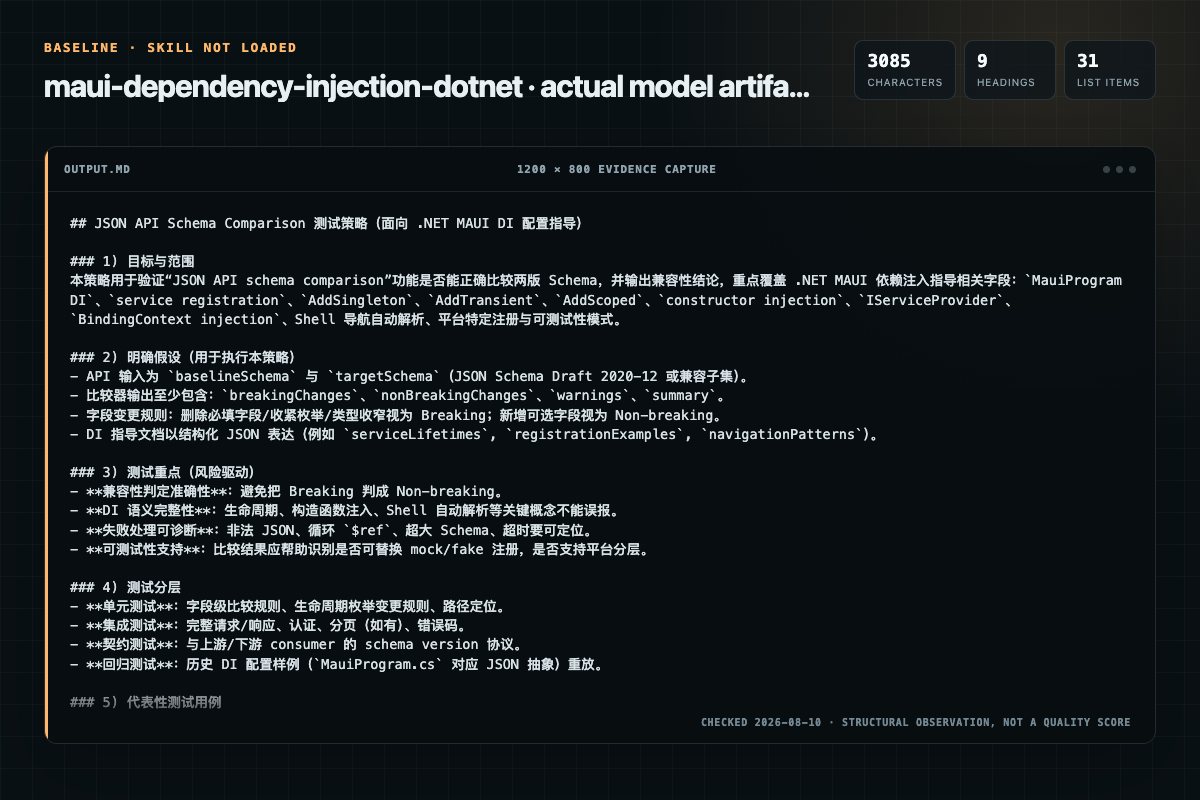
Baseline: 3085 non-whitespace characters, 9 headings, and 31 list items.
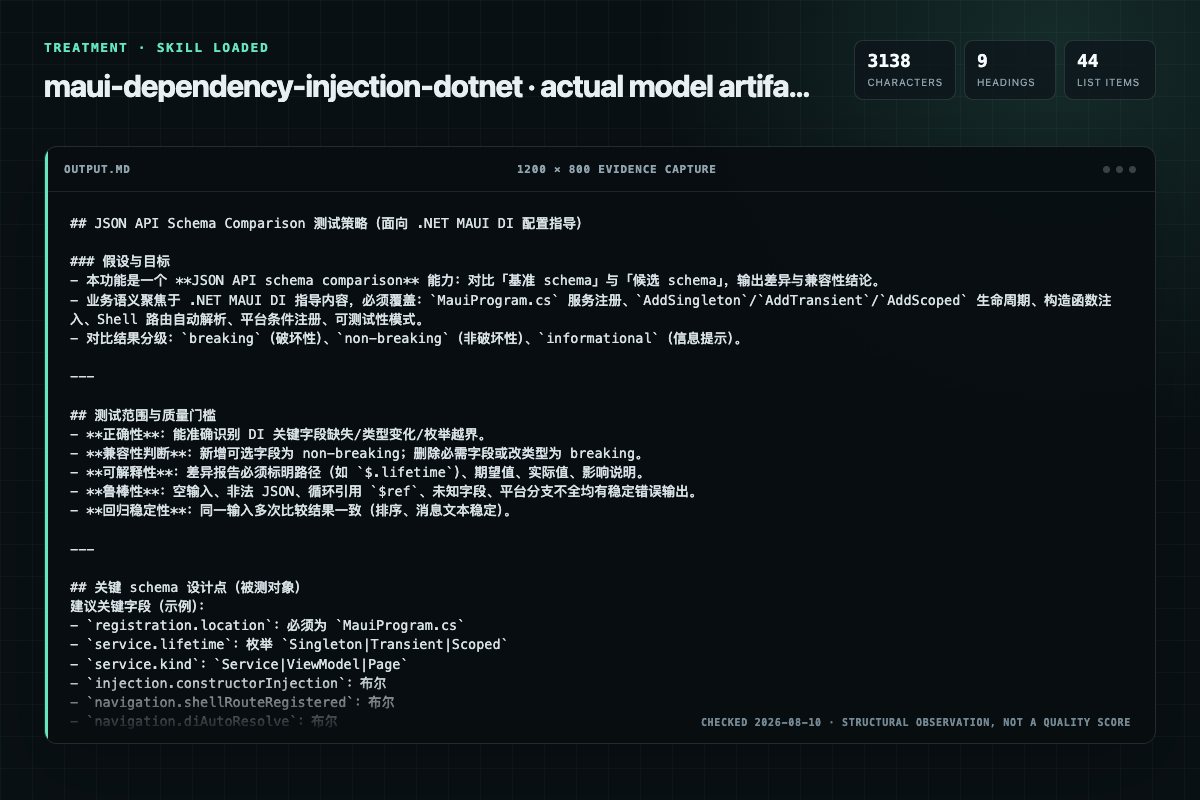
With Skill: 3138 non-whitespace characters, 9 headings, and 44 list items.
| Observation | Without Skill | With Skill |
|---|---|---|
| Source-signal coverage | 3/8: dependency, injection, lifetime | 3/8: dependency, injection, lifetime |
| Output structure | 3085 chars · 9 headings · 31 list items · 0 code blocks | 3138 chars · 9 headings · 44 list items · 0 code blocks |
| Verification and caution signals | 30 verification signals · 7 risk/limitation signals | 27 verification signals · 9 risk/limitation signals |
Use the maui-dependency-injection Skill pinned at ab761ad27acd for my task. Follow its source-specific constraints around `maui-dependency-injection`, `dependency`, `injection`, `inputs`, then return the finished deliverable with explicit assumptions, verification, failure conditions, and limits. Do not treat the Skill text as a factual source or claim that a single demonstration proves universal performance.
Compatibility matrix
| Platform | Status | Evidence | What to check |
|---|---|---|---|
| Codex | Not declared | No explicit evidence | Portability before use |
| Claude Code | Not declared | No explicit evidence | Portability before use |
| Cursor | Not declared | No explicit evidence | Portability before use |
| Gemini CLI | Not declared | No explicit evidence | Portability before use |
Installation
The source command is displayed only when detected. A safe inspection prompt is always available so your agent can explain every action before execution.
npx skills add https://github.com/dotnet/skills --skill "plugins/dotnet-maui/skills/maui-dependency-injection"Inspect the Agent Skill "maui-dependency-injection" from https://github.com/dotnet/skills/blob/1b896e91feb0f613cb54a914f1efd2897810ae02/plugins/dotnet-maui/skills/maui-dependency-injection/SKILL.md at commit 1b896e91feb0f613cb54a914f1efd2897810ae02. List every install step, command, network request, credential, file read/write, external action, and rollback step. Explain whether it fits my task. Do not install or execute anything until I approve.
Workflow
1. Identify all services, ViewModels, and Pages that need to participate in dependency injection. 2. Choose the correct lifetime for each type — AddSingleton for shared services, AddTransient for Pages and ViewModels. 3. Register all types in MauiProgram.CreateMauiApp() on build…
Registering services, ViewModels, and Pages in MauiProgram.cs
XAML data-binding syntax or compiled bindings — use the maui-data-binding skill
A .NET MAUI project with a MauiProgram.cs file
Do not introduce DI into a project that isn't using it, swap a working service lifetime, or add an interface purely for symmetry — only when the user asked or it fixes a real defect.
Permission review
No configured static risk pattern was detected
This is not proof of safety. Runtime behavior, indirect dependencies, and hidden external systems are outside the static scan.
Evidence record
| Signal | Value | Evidence type | Meaning |
|---|---|---|---|
| Quality score | 98/100 | Computed | Documentation, specificity, maintenance, and trust rules |
| Repository stars | 5,248 | Source | Repository attention, not individual Skill quality |
| Compatibility | 0 platforms | Source | Declared in the catalog source record |
| Usage guide | tested outcome page | Tested | Generated or reviewed according to the visible evidence level |
Pinned source
.NET MAUI uses the same Microsoft.Extensions.DependencyInjection container as ASP.NET Core. All service registration happens in MauiProgram.CreateMauiApp() on builder.Services. The container is built once at startup and is immutable thereafter.
MauiProgram.csAddSingleton, AddTransient, and AddScoped#if directivesMauiProgram.cs file| Situation | Do this | Why |
|---|---|---|
| Registering a Page or ViewModel | Prefer AddTransient | A fresh instance per navigation avoids stale state, and a Singleton page cannot be re-added to the visual tree after it is removed. Singleton is defensible for a genuinely single-instance page (e.g. a root tab you want to keep warm) |
| Registering shared/expensive state | AddSingleton | One instance app-wide (settings, DB connection, HttpClient handler) |
Tempted to use AddScoped | Use AddTransient (or AddSingleton if sharing is intended) | MAUI has no built-in request scope like ASP.NET Core's HTTP pipeline. MAUI does create one IServiceScope per window, so a Scoped service lives as long as that window — and resolved from the root provider it behaves like a Singleton. Neither gives you per-navigation freshness |
| Navigating to a DI-registered page | Register the page and its ViewModel, then Routing.RegisterRoute | Shell.Current.GoToAsync resolves the page through DI and injects its constructor dependencies |
| Platform-specific implementation | #if per platform with every platform covered | A missing platform branch leaves the service unregistered and throws at resolution time |
Do not introduce DI into a project that isn't using it, swap a working service lifetime, or add an interface purely for symmetry — only when the user asked or it fixes a real defect.
Answer narrowly, but completely. When you recommend a lifetime change, show the
registration code, and give the realistic alternatives rather than a single verdict —
for a unit-of-work or DbContext question that means AddTransient, an explicit
IServiceScopeFactory.CreateScope(), and the factory pattern
(AddDbContextFactory), with a note on when each fits. A one-line prescription is
usually a worse answer than a short menu with trade-offs.
// Explicit scope when you genuinely need unit-of-work semantics
using var scope = scopeFactory.CreateScope();
var db = scope.ServiceProvider.GetRequiredService<MyDbContext>();
AddSingleton for shared services, AddTransient for Pages and ViewModels.MauiProgram.CreateMauiApp() on builder.Services, grouping by category (services, HTTP, ViewModels, Pages).AppShell.xaml.cs so Shell navigation auto-resolves the full dependency graph.BindingContext.#if directives, ensuring every target platform is covered or has a fallback.null dependencies or missing-registration exceptions at runtime.| Lifetime | When to Use | Typical Types |
|---|---|---|
AddSingleton<T>() | Shared state, expensive to create, app-wide config | HttpClient factory, settings service, database connection |
AddTransient<T>() | Lightweight, stateless, or needs a fresh instance per use | Pages, ViewModels, per-call API wrappers |
AddScoped<T>() | Per-window lifetime, or a manually created IServiceScope | Scoped unit-of-work (rare in MAUI) |
Key rule: Register Pages and ViewModels as Transient by default. Register shared services as Singleton.
⚠️ Avoid
AddScopedunless you manually manageIServiceScope. MAUI has no built-in request scope like ASP.NET Core. MAUI creates oneIServiceScopeper window, so a Scoped service lives as long as that window; resolved from the root provider it silently behaves as a Singleton. Neither gives per-navigation freshness.
public static MauiApp CreateMauiApp()
{
    var builder = MauiApp.CreateBuilder();
    builder.UseMauiApp<App>();

    // Services — Singleton for shared state
    builder.Services.AddSingleton<IDataService, DataService>();
    builder.Services.AddSingleton<ISettingsService, SettingsService>();

    // HTTP — use typed or named clients via IHttpClientFactory
    // Requires NuGet: Microsoft.Extensions.Http
    builder.Services.AddHttpClient<IApiClient, ApiClient>();

    // ViewModels — Transient for fresh state per navigation
    builder.Services.AddTransient<MainViewModel>();
    builder.Services.AddTransient<DetailViewModel>();

    // Pages — Transient so constructor injection fires each time
    builder.Services.AddTransient<MainPage>();
    builder.Services.AddTransient<DetailPage>();

    return builder.Build();
}
Inject dependencies through constructor parameters. The container resolves them automatically when the type is itself resolved from DI.
public class MainViewModel
{
    private readonly IDataService _dataService;

    public MainViewModel(IDataService dataService)
    {
        _dataService = dataService;
    }

    public async Task LoadAsync() => Items = await _dataService.GetItemsAsync();
}
Register both Page and ViewModel. Inject the ViewModel into the Page and assign it as BindingContext:
public partial class MainPage : ContentPage
{
    public MainPage(MainViewModel viewModel)
    {
        InitializeComponent();
        BindingContext = viewModel;
    }
}
When a Page is registered in DI and as a Shell route, Shell resolves it (and its full dependency graph) automatically on navigation:
// MauiProgram.cs
builder.Services.AddTransient<DetailPage>();
builder.Services.AddTransient<DetailViewModel>();

// AppShell.xaml.cs
Routing.RegisterRoute(nameof(DetailPage), typeof(DetailPage));

// Navigate — DI resolves DetailPage + DetailViewModel
await Shell.Current.GoToAsync(nameof(DetailPage));
DI supplies the ViewModel's dependencies; navigation parameters arrive separately.
Don't try to inject them through the constructor — implement IQueryAttributable
on the ViewModel so it receives both:
public class DetailViewModel : ObservableObject, IQueryAttributable
{
    readonly IDataService _data;   // ← injected by DI

    public DetailViewModel(IDataService data) => _data = data;

    public void ApplyQueryAttributes(IDictionary<string, object> query)
    {
        // ← supplied by navigation
        if (query.TryGetValue("id", out var id))
            LoadAsync(id.ToString()!);
    }
}

// Navigate with a parameter — the page and its ViewModel still come from DI
await Shell.Current.GoToAsync($"{nameof(DetailPage)}?id={product.Id}");
Shell applies query attributes to the page and its BindingContext, so the
ViewModel receives them without any wiring in the page.
Use preprocessor directives to register platform implementations. Always cover every target platform or provide a no-op fallback to avoid runtime null.
#if ANDROID
builder.Services.AddSingleton<INotificationService, AndroidNotificationService>();
#elif IOS || MACCATALYST
builder.Services.AddSingleton<INotificationService, AppleNotificationService>();
#elif WINDOWS
builder.Services.AddSingleton<INotificationService, WindowsNotificationService>();
#else
builder.Services.AddSingleton<INotificationService, NoOpNotificationService>();
#endif
Prefer constructor injection. Use explicit resolution only where injection is genuinely unavailable (custom handlers, platform callbacks):
// From any Element with a Handler
var service = this.Handler.MauiContext.Services.GetService<IDataService>();
For dynamic resolution, inject IServiceProvider:
public class NavigationService(IServiceProvider serviceProvider)
{
    public T ResolvePage<T>() where T : Page
        => serviceProvider.GetRequiredService<T>();
}
Define interfaces for every service so implementations can be swapped in tests:
public interface IDataService
{
    Task<List<Item>> GetItemsAsync();
}

// Production registration
builder.Services.AddSingleton<IDataService, DataService>();

// Test registration — swap without touching production code
var services = new ServiceCollection();
services.AddSingleton<IDataService, FakeDataService>();
// ❌ ViewModel keeps stale state across navigations
builder.Services.AddSingleton<DetailViewModel>();

// ✅ Fresh instance each navigation
builder.Services.AddTransient<DetailViewModel>();
Pages declared in Shell XAML via <ShellContent ContentTemplate="{DataTemplate views:DetailPage}"> are instantiated with Activator.CreateInstance (ElementTemplate.cs), not through the service provider. Constructor injection does not run on that path: if the page's only constructor takes dependencies, you get a MissingMethodException — not a silently null dependency.
Pages reached through Routing.RegisterRoute + GoToAsync are different: they go through ActivatorUtilities.GetServiceOrCreateInstance (Routing.cs), which injects registered dependencies even if the page type itself was never registered, and throws if a required dependency cannot be resolved.
// Registering the page and its dependencies keeps both paths working
builder.Services.AddTransient<DetailPage>();
builder.Services.AddTransient<DetailViewModel>();
If you need DI for a tab/flyout page, give it a parameterless constructor that resolves what it needs, or navigate to it by route instead of embedding it in ContentTemplate.
XAML resources in App.xaml are parsed during InitializeComponent() — before the container is fully available. Defer service-dependent work to CreateWindow():
public partial class App : Application
{
    private readonly IServiceProvider _services;

    public App(IServiceProvider services)
    {
        _services = services;
        InitializeComponent();
    }

    protected override Window CreateWindow(IActivationState? activationState)
    {
        // Safe — container is fully built
        // Requires: builder.Services.AddTransient<AppShell>() in MauiProgram.cs
        var appShell = _services.GetRequiredService<AppShell>();
        return new Window(appShell);
    }
}
// ❌ Hides dependencies, hard to test
var svc = this.Handler.MauiContext.Services.GetService<IDataService>();

// ✅ Constructor injection — explicit and testable
public class MyViewModel(IDataService dataService) { }
Forgetting a platform in #if blocks means GetService<T>() returns null at runtime on that platform. Always include an #else fallback or cover every target.
See the rule table above: AddScoped gives you either window lifetime or Singleton behaviour, never per-navigation freshness. Use AddTransient or AddSingleton unless you explicitly create and manage an IServiceScope.
MauiProgram.csAddTransient; shared services use AddSingleton#if registrations cover all target platforms or include a fallbackCreateWindow(), not run during XAML parseAddScoped used only when window lifetime is intended, or alongside a manually created IServiceScopeFrequently asked questions
.NET MAUI uses the same Microsoft.Extensions.DependencyInjection container as ASP.NET Core. All service registration happens in MauiProgram.CreateMauiApp() on builder.Services. The container is built once at startup and is immutable thereafter.
The source record exposes this install command: npx skills add https://github.com/dotnet/skills --skill "plugins/dotnet-maui/skills/maui-dependency-injection". Inspect the command and pinned source before running it.
Alternatives
garrytan/gbrain
End-to-end discipline for turning any large data source (audio libraries, email takeouts, document corpora, chat exports, API dumps) into brain pages at scale. The lifecycle spine: SCHEMA → ACCESS → TRIAL → EVALUATE → IMPROVE → CODIFY → TEST → SKILLIFY → BULK → MONITOR. State is tracked in a durable JSON manifest (see MANIFEST-PATTERN.md) so any crash, session boundary, or subagent fan-out resumes from ground truth instead of memory.
alirezarezvani/claude-skills
App Store Optimization (ASO) toolkit for researching keywords, analyzing competitor rankings, generating metadata suggestions, and improving app visibility on Apple App Store and Google Play Store. Use when the user asks about ASO, app store rankings, app metadata, app titles and descriptions, app store listings, app visibility, or mobile app marketing on iOS or Android. Supports keyword research and scoring, competitor keyword analysis, metadata optimization, A/B test planning, launch checklist
dotnet/skills
Migrates .NET test projects from VSTest to Microsoft.Testing.Platform (MTP). Use when user asks to "migrate to MTP", "switch from VSTest", "enable Microsoft.Testing.Platform", "use MTP runner", set OutputType=Exe only for test projects in Directory.Build.props, or mentions EnableMSTestRunner, EnableNUnitRunner, or UseMicrosoftTestingPlatformRunner. USE FOR: MTP behavioral differences vs VSTest (exit code 8, zero tests discovered, --ignore-exit-code, TESTINGPLATFORM_EXITCODE_IGNORE); centralizing
vipshop/cache-dit
High-level guide for integrating a new DiT model into cache-dit: Cache (BlockAdapter/ForwardPattern), Context Parallelism, Tensor Parallelism, Text Encoder Parallelism (TE-P), VAE Parallelism (VAE-P), generate CLI, installation, testing workflow, and detailed references. Use when adding support for a new diffusion transformer model in cache-dit.